Create from scratch
Enter your product name, ingredients, allergens, nutrition values, and business details. Build a label without needing an existing package.
Explore the food label generatorStart with product details or an existing package. Review your multilingual label, then download a PDF for printing.
Available for iPhone and iPad. Android early access is open.
Built for importers, exporters, distributors, and small food brands.
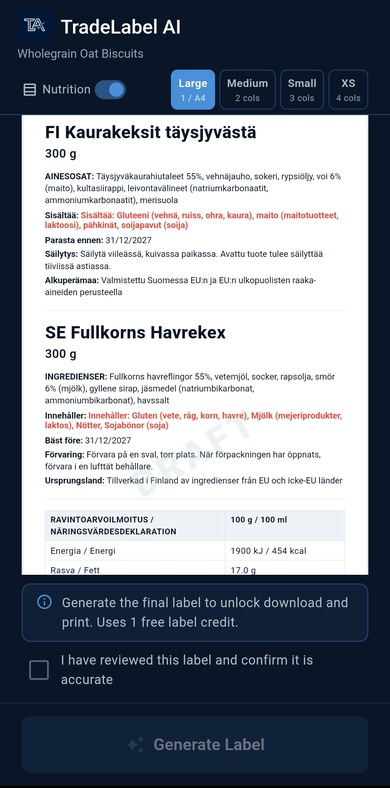
This in-app example shows Finnish and Swedish label text together, with ingredients, highlighted allergens, and a nutrition table.
Start with the product information you have, then choose your target markets and languages.
Enter your product name, ingredients, allergens, nutrition values, and business details. Build a label without needing an existing package.
Explore the food label generatorPhotograph the label and nutrition panel. AI extracts the information into editable fields so you can correct it and prepare another language version.
Explore food label translationSelect your EU target markets and prepare the language versions you need.
Check translations and product details. Correct missing or inaccurate information.
Preview the layout, confirm your review, and generate a PDF for printing.
Keep product information organised as suppliers, packaging, and destination markets change.
Turn packaging photos into editable product details instead of retyping each field.
Prepare another language version from the same product information.
Missing-field flags help you identify information that needs attention during review.
Save your product details and return to them when ingredients, packaging, or markets change.
Use supplier packaging as a starting point for labels in your destination market's languages.
Create a label from your product details and reuse them when entering another EU market.
Keep label information together as products, suppliers, or packaging change.
Check editable drafts and label previews before sending the PDF to print.
Explore destination markets below, then choose the supported languages for your label in the app.
TradeLabelAI helps teams prepare market-specific label drafts across the EU without duplicating the same product work over and over.
Tap the map or choose a country below. This list shows every EU market supported in the workflow.
TradeLabelAI helps prepare market-ready label content while keeping final review in human hands.
Check the source information, translated wording, allergens, and destination market requirements before printing or using a label.
TradeLabelAI assists with preparation. It does not guarantee regulatory compliance or replace qualified review. Your business is responsible for the final label.
TradeLabelAI is available now for iPhone and iPad. For Android, join the early access list and we will email you when access is ready.
Free trial allowances and paid plans are shown in the app. Check the current allowance and what is included before generating labels or purchasing a plan.
You can generate a PDF after reviewing your label. Check the layout in the app and confirm the paper size and printer settings before printing a production batch.
No. You can enter your product details to create a label from scratch, or scan an existing package to extract and translate its information.
TradeLabelAI focuses on EU markets. Choose your destination and supported languages in the app, such as Finnish, Swedish, German, or French, and verify the final wording for your market.
Yes. Review and edit the extracted details and translations before generating your label. AI can make mistakes, so compare the draft with your source information.
No. Your business remains responsible for the final label and any required regulatory or qualified expert review.
Download for iPhone and iPad, or join the Android early access list.